









 4.5 on
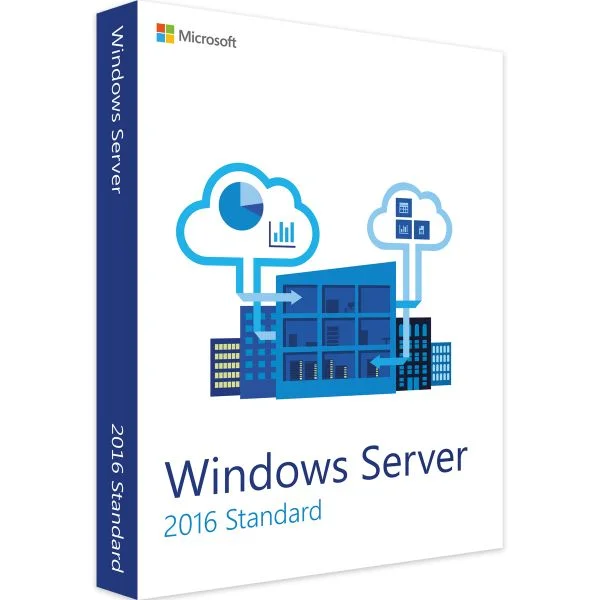



Digital license key delivered via email, including a step-by-step guide & download link.



Digital license key delivered via email, including a step-by-step guide & download link.
Fast and reliable! Bought a Microsoft Office 2021, and the process was smooth and quick.
Paul Dean, 🇬🇧
Their service is straightforward, and they deliver what they promise. No frills, just good products and responsive support when needed.
Gail Schloss, 🇨🇦
Super expérience avec Licengo ! Achat de logiciel Microsoft et clé de licence reçue instantanément. Service et support excellents. Je recommande vivement !
Henry tKint, 🇧🇪
Licengo delivers excellent digital products with prompt service and professional communication. Highly reliable partner!
Darrell Carnell, 🇨🇦
I recently purchased Office 2021 Pro Plus from Licengo, and the experience was flawless! The process was quick and simple, and I received my product key within minutes only. Installation was smooth, and the software works perfectly. Great value for money and excellent customer service. Highly recommend!
Sandra, 🇬🇧
Windows Server 2016 Standard
Windows Server 2016 Standard is a cloud-ready operating system that supports existing workloads while also providing smooth migration paths to cloud computing. It enhances security with advanced features and incorporates Azure-inspired innovations, boosting applications and infrastructure. When purchased, it activates 16 cores and allows running two Operating System Environments, whether virtual or physical. For servers exceeding 16 cores, additional products are required.
Main Features:
- Calculate functions
- Hyper-V for virtualization
- Nano Server for lightweight environments
- Shielded virtual machines for security
- Identity and Access management
- Active Directory Certificate Services
- Active Directory Domain Services
- Active Directory Federation Services
- Web application proxy
- Administration tools
Installation options:
Server Core: This option installs core Windows Server components without a graphical user interface (GUI). It supports all server roles and is ideal for headless deployments managed remotely with tools like PowerShell.
Desktop Experience Server: This installation option provides a full GUI and is perfect for customers preferring a traditional desktop environment with graphical management tools.
Resources:
Product Website | Windows Server solutions across on-premises and cloud
Microsoft Docs | Windows Server technical documentation
Community | Microsoft Tech Community: Windows Server
Getting Started Guide | Get started with Windows Server
Upgrade Options | Overview of Windows Server upgrades
| Duration |
Lifetime |
|---|---|
| Devices |
1 PC |
| Activation |
Online |
| Warranty |
1 year |
| Processor |
1.4 GHz or faster (64-bit) |
| Memory |
512 MB for Server Core 2 GB for Server with Desktop Experience, ECC type or similar for physical host deployments |
| Hard Disk |
32 GB of free space |
| Display |
Super VGA (1024 x 768) or higher-resolution |
| Brand |
Microsoft |
11 reviews for Windows server 2016 Standard
Clear filtersFrequently Asked Questions
What is the difference between Standard and Datacenter editions?
The Standard edition is designed for low-density or non-virtualized environments, while the Datacenter edition is for highly virtualized and cloud-based environments. Datacenter includes additional features like Storage Spaces Direct and Shielded Virtual Machines.
Can I use the same license key for multiple installations?
No, each license key is valid for one server installation. For additional servers, you need separate licenses.
How do I activate Windows Server 2016 Standard?
You can activate it through the activation wizard or by using a Key Management Service (KMS).
Does Windows Server 2016 Standard support virtualization?
Yes, it supports up to two virtual machines (VMs) and one Hyper-V container per license.
What are the main features of Windows Server 2016 Standard?
- Windows Defender Advanced Threat Protection
- Nano Server (lightweight installation option)
- Improved identity management with Active Directory
- Enhanced storage features, like Storage Replica
What is Nano Server in Windows Server 2016?
Nano Server is a minimal-footprint OS optimized for running cloud-native and container-based applications.
Does Windows Server 2016 Standard support 32-bit processors?
No, Windows Server 2016 only supports 64-bit processors.
Is Windows Defender included in Windows Server 2016 Standard?
Yes, Windows Defender is included and enabled by default to provide built-in malware protection
Where can I get official technical support for Windows Server 2016 Standard?
Microsoft provides technical support through its website, including forums, knowledge base articles, and customer service.
In this guide, we explain step-by-step how to download, install, and successfully activate Windows Server 2016 Standard:
- Download Windows Server 2016 image file from Download Center (Direct link to Microsoft’s servers).
- Create a Bootable USB Drive:
Use a tool like Rufus or the Windows USB/DVD Download Tool (We chose Rufus for this tutorial):- Open Rufus.
- Select your USB drive.
- Choose the Windows Server ISO file.
- Select GPT or MBR partition scheme depending on your BIOS/UEFI setup.
- Click Start to create the bootable USB.
- To activate Windows Server 2016 Standard Edition using CMD, run Command Prompt as an administrator and execute the following command:
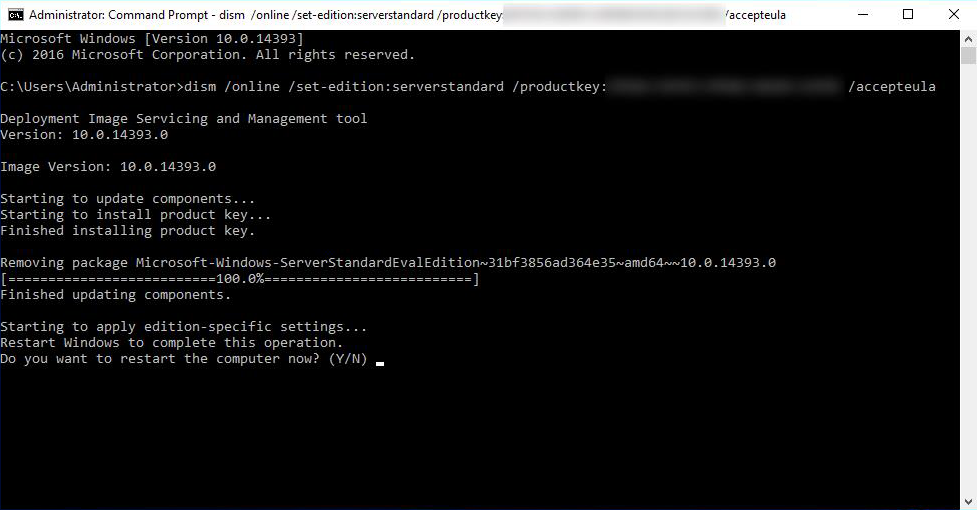
Dism /online /Set-Edition:ServerStandard /AcceptEula /ProductKey:XXXXX-XXXXX-XXXXX-XXXXX-XXXXX
Replace XXXXXX****X with your product key.


Josette (verified owner) –
très satisfait, je recommande.
Store manager admin –
Nous sommes tellement reconnaissants pour votre note de 5 étoiles ! L’équipe de Licengo est engagée à vous garder satisfait.
Julie (verified owner) –
Je suis content, tout a été parfait.
Store manager admin –
Nous sommes ravis que vous ayez apprécié votre expérience ! Licengo est là pour continuer à fournir un service de qualité.
Lena (verified owner) –
Perfekte Abwicklung, gerne wieder.
Store manager admin –
Vielen Dank für Ihre liebe Bewertung! Das Licengo-Team ist motiviert, weiterhin das Beste zu bieten.
علي (verified owner) –
أسعار ممتازة وتراخيص برمجية أصلية.
Store manager admin –
شكرًا لك على المراجعة الرائعة! عملاء مثلك هم من يلهمون فريق ليسينجو.
Kimberly (verified owner) –
Snel en efficiënt, zeer tevreden.
Store manager admin –
Heel erg bedankt voor je 5-sterren beoordeling! Het team van Licengo is erg blij met deze feedback en zal blijven streven naar uitstekend werk.