Our customers say Excellent 4.5 out of 5 en based on
Excellent 4.5 on

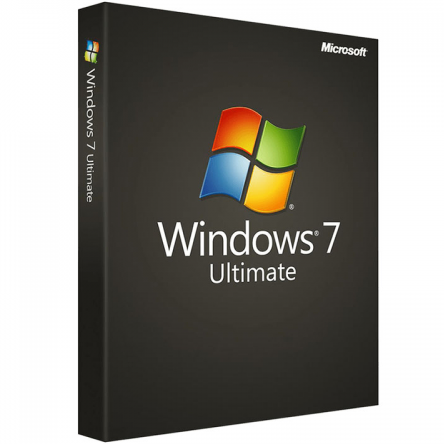
Windows 7 Ultimate – Digital Licence

(7 customer reviews)

£13.90

11 People watching this product now!

We are a certified Microsoft Partners
Click to verify

Digital license key delivered via email, including a step-by-step guide & download link.

Buy Windows 7 Ultimate Genuine Product License Key. Instant delivery to your Email.

£13.90

12 People watching this product now!

Windows 7 Ultimate – Digital Licence

We are a certified Microsoft Partners
Click to verify

Digital license key delivered via email, including a step-by-step guide & download link.

11 People watching this product now!

Buy Windows 7 Ultimate Genuine Product License Key. Instant delivery to your Email.

Duration

Lifetime

Devices

1 PC

Activation

Online

Warranty

1 year

Brand

Microsoft

SKU: 9485841348 Categories: ,

Reviews

Real reviews from verified buyers to help you make the best choice.

Description

Windows 7 Ultimate stands out as the most comprehensive and powerful edition of Windows 7, designed primarily to provide optimal support for small businesses and professional users. This operating system not only brings visual enhancements to the user interface but also introduces numerous new features tailored to meet professional requirements. Additionally, it includes a complete package of essential programs and features, making it a versatile choice for demanding computing needs.

A clearly structured user interface coupled with enhanced performance.

The Windows 7 Ultimate operating system offers more than just a new and user-friendly operator interface. It introduces several general visual improvements across all applications. For instance, it removes the sidebars present in the previous Windows Vista version. In Windows 7 Ultimate, widgets can now be freely placed anywhere on the desktop, allowing users to create their own personalized workspace with easy access to vital programs and applications.

Furthermore, basic programs such as Paint and WordPad in Windows 7 Ultimate feature a ribbon menu, similar to Microsoft Office 2007. This menu interface provides a clear and intuitive method for accessing key functions, enhancing usability and productivity.

All the important innovations in Win 7 Ultimate

A visually and technically enhanced system like Microsoft Windows 7 introduces numerous new features and programs. The following improvements highlight why Windows 7 Ultimate is the ideal choice for your computing needs:

  • Device Stages: Enhanced management for external devices.
  • Problem Steps Recorder: Improved logging of issues and problems.
  • “Libraries”: Key document folders neatly organized in Explorer for easier access.
  • New Security Centre (“Action Centre”): Monitors firewall and virus scanner activities.
  • Voice Commands and Voice Output: Operational support for users with accessibility needs.
  • Jump Lists: Provides quick access to recent data and programs.
  • Location Aware Printing: Automatically selects the correct printer based on your location.
  • Remote Desktop Host: Enables hosting remote desktop sessions for accessing computers from afar.

Advanced functions:

Windows 7 has been optimized by removing redundant features and incorporating additional functions from the Professional version. It now includes:

  • Support for Windows Server Domains, enhancing integration with enterprise networks.
  • XP Mode, allowing seamless operation of older programs.
  • Exclusive inclusion of the “BitLocker” disk encryption program for enhanced data security.
  • Built-in support for starting virtual disks in VHD format.
  • Flexibility to change the system language at any time to meet user preferences.

These enhancements make Windows 7 a comprehensive choice, ideal for both professional and personal computing environments seeking advanced security, compatibility with legacy applications, and user-friendly customization options.


Hardware requirements
Duration

Lifetime

Devices

1 PC

Activation

Online

Warranty

1 year

Processor

1 GHz or faster

Memory

1 GB (32-bit) or 2 GB (64-bit)

Hard Disk

16 GB for 32-bit or 20 GB for 64-bit

Graphics Hardware

DirectX 9 or later

Brand

Microsoft

Reviews (7)
4.9
7 reviews
6
1
0
0
0

7 reviews for Windows 7 Ultimate – Digital Licence

Clear filters
  1. English

    Roberto (verified owner)

    Buena experiencia de compra, no tuve problemas.

    • Spanish

      Store manager admin

      Gracias por la increíble reseña. Licengo está emocionado de seguir cumpliendo con tus expectativas.

Show only reviews in English (2)

Add a review

Your email address will not be published. Required fields are marked *

FAQs

Frequently Asked Questions

What are the key features of Windows 7 Ultimate?

Windows 7 Ultimate offers a range of advanced features, including:

  • Multilingual User Interface: Switch between languages.
  • BitLocker Drive Encryption: Protect data with full disk encryption.
  • Windows Media Center: Manage and stream digital content.
  • VHD Booting: Boot from virtual hard drives.
  • Advanced Backup: Customizable backups and system image restore.
  • Domain Join: Integration into corporate networks for better security.
  • This edition combines comprehensive functionality for both home and professional users.

    Can I still download and install Windows 7 Ultimate?

    While Microsoft officially ended support for Windows 7 on January 14, 2020, you can still download and install Windows 7 Ultimate from official sources.

    What is the system requirement for Windows 7 Ultimate?

    • Processor: 1 GHz or faster (32-bit or 64-bit).
    • RAM: 1 GB for 32-bit or 2 GB for 64-bit.
    • Hard disk: 16 GB for 32-bit or 20 GB for 64-bit.
    • Graphics: DirectX 9 with WDDM 1.0 or higher driver.

    Is Windows 7 Ultimate compatible with modern software?

    Many modern applications no longer support Windows 7 due to its end-of-life status. Check software compatibility before installation.

    Can I upgrade Windows 7 Ultimate to Windows 10 or 11?

    Yes, you can upgrade to Windows 10 or 11, but you may need to purchase a new license. Ensure your hardware meets the requirements for the newer operating systems.

    How do I install Windows 7 Ultimate?

    • Obtain a genuine installation file or disc.
    • Create a bootable USB or use the disc to start the installation process.
    • Follow the on-screen instructions, ensuring to back up important data beforehand.

    Is Windows 7 Ultimate secure to use in 2025?

    No, Windows 7 is no longer secure for daily use as it doesn’t receive security updates. Consider upgrading to a newer operating system like windows 11 pro.

    Where can I find help with Windows 7 Ultimate?

    • Check community forums or third-party tech support websites.
    • For official documentation, refer to the archived Microsoft support pages.
    Installation Guide
    Guide and download links will be sent to you by email after placing an order.

    How It work

    Follow these quick and easy steps to purchase, download, and activate your software hassle-free.

    Buy Securely at Licengo.com

    Purchase your product safely with SSL encryption at competitive prices.

    1.

    Receive Your License Key via Email

    We will send you the activation key and detailed download instructions to your email.

    2.

    Download Your Original Software

    Easily download your original software using the provided instructions.

    3.

    Activate Your Lifetime License

    Enjoy lifetime access to your software with the license key purchased from Licengo.com.

    4.

    Competitive Prices

    We offer the best prices in the market, get genuine products at discounted prices.

    Customer Support

    Our human support available to help you resolve any incident as quickly as possible.

    We Deliver Instantly

    After receiving payment, product are delivered instantly, some products may take a few hours.

    Refund Guarantee

    If we are not satisfied with the quality or fail to deliver the product, we will refund you.