









 4.5 on



Digital license key delivered via email, including a step-by-step guide & download link.
- 100% Original Lifetime License
- Online activation
- 25-Character license key (XXXXX-XXXXX-XXXXX-XXXXX-XXXXX).
- Requires Windows 10 or Windows 11 (MacOS version of Office 2021 Home and Business is available here)
- INSTANT DELIVERY: Your License, Installation guide, and Download link are automatically sent to you by email.
This includes:










Digital license key delivered via email, including a step-by-step guide & download link.
- 100% Original Lifetime License
- Online activation
- 25-Character license key (XXXXX-XXXXX-XXXXX-XXXXX-XXXXX).
- Requires Windows 10 or Windows 11 (MacOS version of Office 2021 Home and Business is available here)
- INSTANT DELIVERY: Your License, Installation guide, and Download link are automatically sent to you by email.
This includes:
Fast and reliable! Bought a Microsoft Office 2021, and the process was smooth and quick.
Paul Dean, 🇬🇧
Their service is straightforward, and they deliver what they promise. No frills, just good products and responsive support when needed.
Gail Schloss, 🇨🇦
Super expérience avec Licengo ! Achat de logiciel Microsoft et clé de licence reçue instantanément. Service et support excellents. Je recommande vivement !
Henry tKint, 🇧🇪
Licengo delivers excellent digital products with prompt service and professional communication. Highly reliable partner!
Darrell Carnell, 🇨🇦
I recently purchased Office 2021 Pro Plus from Licengo, and the experience was flawless! The process was quick and simple, and I received my product key within minutes only. Installation was smooth, and the software works perfectly. Great value for money and excellent customer service. Highly recommend!
Sandra, 🇬🇧
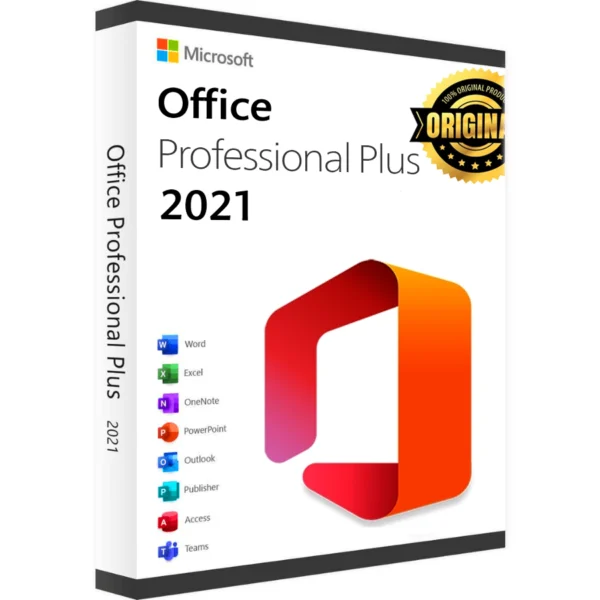
Microsoft Office 2021 Professional Plus includes all the tools you need for your daily work, ideal for both home and office use. Discover incredible savings with a perpetual license, you won’t have to worry about annual renewals, take advantage of this fantastic opportunity to own it at an unbeatable price without sacrificing quality.
This one-time, low-cost purchase gives you:
- Full version with no restrictions on duration of use
- No need to pay subscription
- Get your product key and download link in seconds
- All purchases are backed by our excellent customer service
- Click add to cart and discover the benefits of Office 2021 Professional Plus at a bargain price
Microsoft Office 2021 Professional Plus Programs
Everything you expect from an Office app, and more!
We hate to stress this, but choosing affordability doesn’t mean sacrificing quality! When you purchase your product key, you get immediate access to the full suite of Office 2021 Professional Plus programs.
This includes
Microsoft Word:
For decades, Microsoft Word has set industry standards. This latest release is packed with innovative features and useful tools, including Line Focus, Translation Tools, and advanced editing features.
Microsoft Excel:
Effortlessly create spreadsheets with Microsoft Excel. This release introduces revolutionary features like Dynamic Arrays, Sheet Views, XLOOKUP, and more.
Microsoft PowerPoint:
Enhance your presentations with Microsoft PowerPoint. The Office 2021 Professional Plus version includes enhanced features such as Record Presentation, improved slide animations, and easier arrangement of slide elements.
Microsoft Outlook:
Manage your email, calendars, and tasks in one place with Microsoft Outlook. This release offers instant search and real-time email translation into over 70 languages.
Microsoft Access:
Use powerful data management tools with Microsoft Access. The latest release includes an updated Linked Table Manager, improved date/time data types, and enhanced tab management.
Microsoft Publisher:
Design and publish effortlessly with Microsoft Publisher. Create stunning posters, flyers, and business cards with ease.
Microsoft Teams:
Collaborate effectively with Microsoft Teams, now integrated into Office 2021 Professional Plus. Its features include file sharing, task tracking, and video conferencing to support remote work environments.
All of these features are available for a single, affordable fee!
| Duration |
Lifetime |
|---|---|
| Devices |
1 PC |
| Activation |
Online |
| Warranty |
1 year |
| Operating System |
Windows 10 ,Windows 11 |
| Processor |
1.6 GHz, 2-core |
| Memory |
4 GB (64bit), 2 GB (32bit) |
| Hard Disk |
4.0 GB of available disk space |
| Display |
1024 x 768 |
| Graphics Hardware |
DirectX 10 |
| Brand |
Microsoft |
| Label |
Limited-Time Offer |
1 review for Microsoft Office 2021 Professional Plus – Online Activation – Lifetime Digital License
Clear filtersFrequently Asked Questions
What’s the difference between Office 2021 Pro Plus and Microsoft 365?
Office 2021 Pro Plus is a one-time purchase with no ongoing subscription fees. Microsoft 365, on the other hand, is a subscription-based service that provides access to the latest versions of Office apps, cloud storage, and other premium features such as regular updates, collaboration tools, and more.
Can I use Office 2021 Pro Plus on multiple devices?
Office 2021 Pro Plus is typically licensed for installation on one PC or Mac. Additional licenses are required to install on multiple devices.
Is Office 2021 Pro Plus compatible with Windows 11?
Yes, Office 2021 Pro Plus is fully compatible with Windows 11, as well as previous versions of Windows, including Windows 10.
Do I need an internet connection to use Office 2021 Pro Plus?
While you don’t need an internet connection to use the Office apps themselves after installation, an internet connection is required for downloading and activating the software, as well as for using certain features like cloud storage in OneDrive.
How can I install Office 2021 Pro Plus?
You can install Office 2021 Pro Plus by downloading it from the Microsoft website or by using an installation disc if you purchased a physical copy. After installation, you’ll need to activate Office using the provided product key
Is Office 2021 Pro Plus a one-time purchase or subscription?
Office 2021 Pro Plus is a one-time purchase, meaning you pay once and own the software forever. However, updates and new features are not included after the initial release.
Can I upgrade to Office 2021 Pro Plus from an older version?
Yes, you can upgrade from an older version of Office (such as Office 2016 or Office 2019) to Office 2021 Pro Plus. You will need to purchase a new license for Office 2021, as it is not a free upgrade.
How do I activate Office 2021 Pro Plus?
To activate Office 2021 Pro Plus, you need a valid product key. During the installation process, you will be prompted to enter the key, which you can find on your purchase confirmation or inside the packaging if you bought a physical copy.
Can I uninstall and reinstall Office 2021 Pro Plus on a new PC?
Yes, you can uninstall Office 2021 Pro Plus from one PC and reinstall it on a new device, but the license allows you to use the software on only one PC at a time. Make sure to deactivate it on the old machine before installing it on the new one.
Download the program with the following download link
| LANGUAGE | 64 BITS | 32 Bits |
| DEUTSCH | Herunterladen | Herunterladen |
| ENGLISH | Download | Download |
| FRANÇAIS | Télécharger | Télécharger |
| ITALIANO | Scarica | Scarica |
| ESPAÑOL | Descargar | Descargar |
| NEDERLANDS | Downloaden | – |
| SVERIGE | Downloaden | – |
This EXE file is the basis for the installation of the product.
PLEASE NOTE: To ensure a successful installation of the lifetime version of Office, we recommend that you uninstall any previously installed versions of Office on your computer, including Office 365, as it may cause conflicts during installation.
1- Installation process:
Once the download is complete, follow these steps:
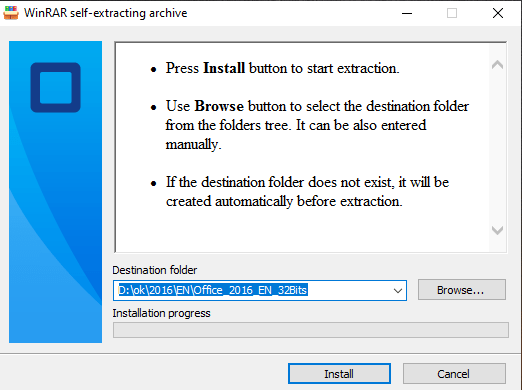
- Right Click on the file and then select the option, “Run as administrator”
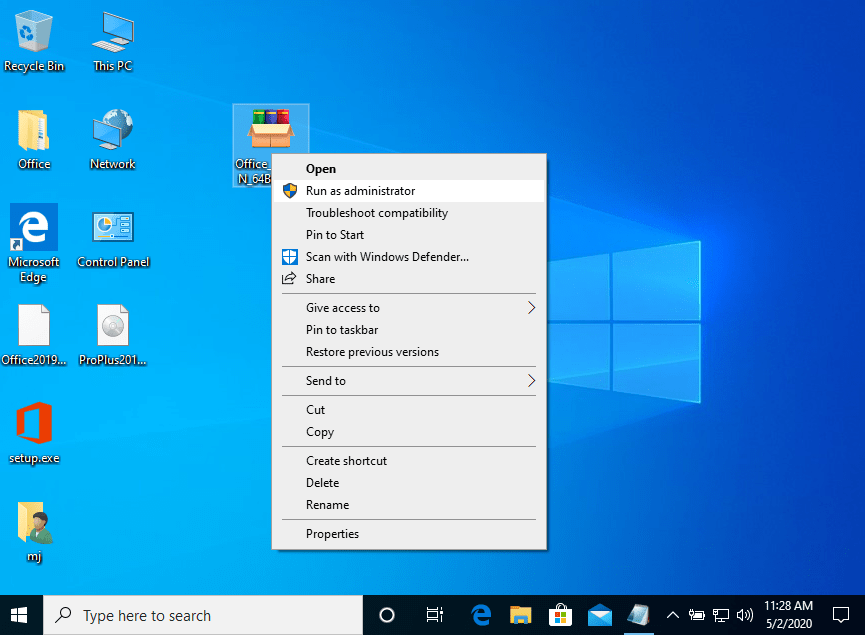
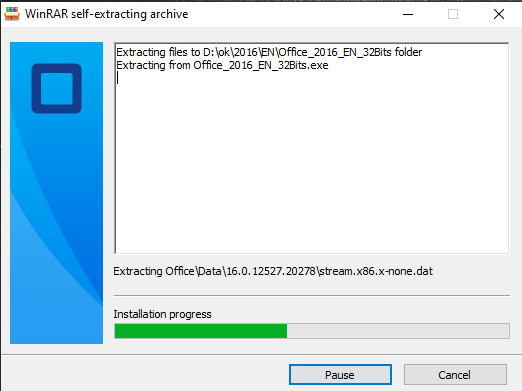
2. Click on the “Install” button. This action unzips the application and will install your product.
2- Software activation:
Once the download is complete and the installation of the program is complete, enter the activation key when running any application from the Microsoft Office package, it will be the first thing that will ask you.
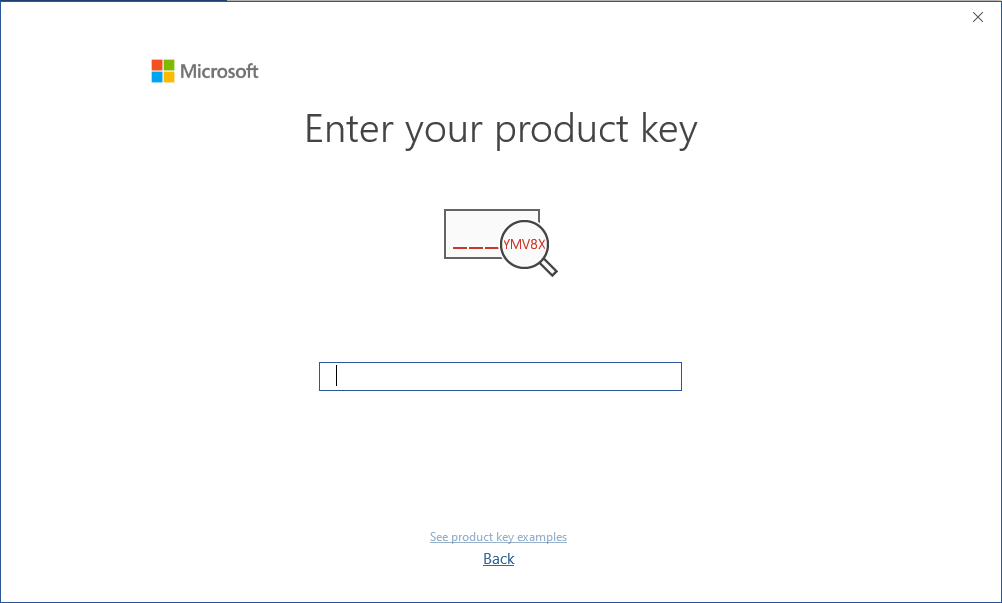
During the installation of Microsoft Office, you should have been prompted to enter the product key we sent you. If this did not happen, please open Word, click on “File,” then “Account,” and enter the provided key there.
If you don’t do this, your purchased Microsoft Office will turn into a trial version after 30 days.
Microsoft has gradually phased out support for some older products. Therefore, telephone activation is no longer possible. If you have any problems or questions during the Installation, please contact our 24/7 customer service.
Step 1: Download
Download the virtual DVD of Microsoft Office 2021 Professional Plus directly from Microsoft’s servers by choosing your preferred language and clicking the download button.
In some cases, you might receive a security message from your browser when trying to download the file (depending on your security settings). You can accept the message without any concerns because it’s a direct link to Microsoft’s Content Delivery Network (officecdn.microsoft.com).
Step 2: Installation
After successfully downloading, please go to the download folder, double-click the downloaded file, and the setup will start automatically.
- Normally, Windows 10 or 11 automatically opens the file when double-clicked.
- However, in rare cases, particularly when other programs (like DVD software) are linked with those file types, issues can arise.
- If this happens, right-click the file, select Mount, and a new drive will appear under This PC in Windows Explorer. Access this drive to begin installation. This process is known as image mounting, similar to inserting a DVD.
The installation will start, and when the process is done, please close the window.
Step 3: Activation
Please open one of the Office programs that have just been installed, for example, Word or Excel. If you are not able to find them, please open the Windows Start Menu, and you will find them there. In the next step, please apply the product key provided by us to activate the software.
Important: If your PC came with a preinstalled version of Microsoft 365, please uninstall it in order to use Microsoft Office 2021 Professional Plus. Otherwise, there will be a conflict between both versions.



phyllis (verified owner) –
very good experience, will use again for sure
Store manager admin –
Your recognition means the world to us at Licengo. Thank you for sharing your experience!